SFTP Transfer Method
The following steps are required to use the fileX SFTP service
Open firewall to allow outbound traffic on port 22 to FINRA SFTP host IP addresses.
- Request FINRA to allow inbound traffic on port 22 for your outbound server’s internet routable IP address. Please call FINRA support at 800-321-6273 and provide the list of external IPs to be whitelisted to open the network/firewall from FINRA.
- Request FINRA Credentials (if not already available) with entitlements for specific FINRA application file transfer.
- Install and configure a SFTP client/library to connect and transfer files.
Ensure the following SFTP SSH configurations are set appropriately on your SFTP client
Supported Ciphers and Algorithms List
Supported Ciphers and Algorithms 1 Supported SSH Ciphers - aes128-ctr
- [email protected]
- aes192-ctr
- aes256-ctr
- [email protected]
2 Supported SSH Key Exchange Algorithms - mlkem768x25519-sha256
- mlkem768nistp256-sha256
- mlkem1024nistp384-sha384
- diffie-hellman-group14-sha256
- diffie-hellman-group16-sha512
- diffie-hellman-group18-sha512
- ecdh-sha2-nistp384
- ecdh-sha2-nistp521
- ecdh-sha2-nistp256
- diffie-hellman-group-exchange-sha256
- [email protected]
- curve25519-sha256
3 Supported SSH MAC Algorithms
4
Host-Key Algorithms - rsa-sha2-512
- rsa-sha2-256
- Using On Behalf Of (OBO) for SFTP
- Open your SFTP client.
- Log in with your Prime account user name and password, or you can use your SSH key.
- Once you are connected to the host, you can see the profile org IDs that you are entitled to submit through OBO, and you can upload and download files with that profile org.
- Note: You can view an org ID to see the entitlement for the profile. For example, if an org ID shows 606 NMS, the profile is entitled for SEC Rule 606 NMS Reporting.
- Here is an example of submitting a file OBO using CURL commands:
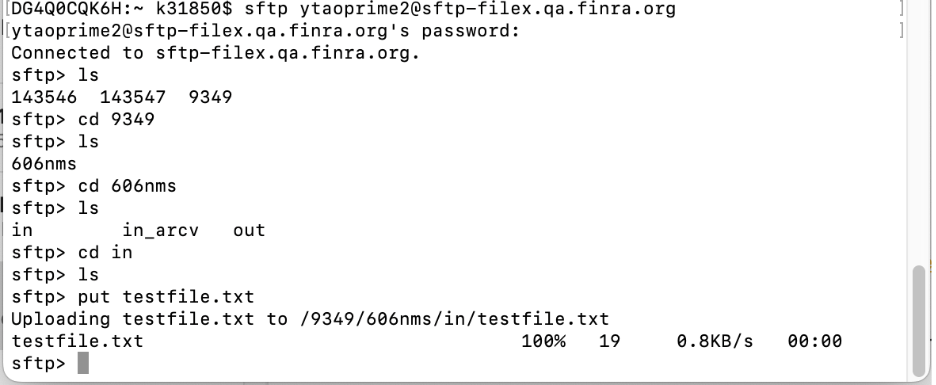
AWS S3 DIRECT TRANSFER
The following steps are required to use the fileX S3 Direct service:
- Open firewall to allow outbound traffic on port 443 from your outbound server IP address to fileX HTTPS REST APIs and to FINRA Identity Platform (FIP) API endpoints.
- Request FINRA Credentials (if not already available) with entitlements for specific FINRA application file transfer.
- Open firewalls to allow traffic to/from AWS S3.
- For AWS S3 IP ranges refer to: https://docs.aws.amazon.com/general/latest/gr/aws-ipranges.html.
- Invoke FIP OAUTH API to obtain OAUTH token .
- Obtain S3 STS access token from the fileX REST API for AWS S3.
- Use the S3 STS access token to upload/download using AWS S3 APIs or AWS CLI or AWS SDK wrapper libraries.
Request Parameters
Parameters Required Accepted Values Case Sensitive Description ORG_ID Y Numerical values 0-9+ N/A Number representing the account’s orgId provided by FINRA (e.g. 0001 or 888888) APPLICATION Y Alphanumeric [a-zA-Z0-9] Y Name of the FINRA application (e.g. focus, crd, appX) Response Attributes
Element/Attribute Key Description region AWS region where S3 bucket is located sessionName Unique identifier generated by fileX for the request to generate the token readPaths List of application spaces available to the users to download file(s) writePaths List of application spaces available to the users to upload file(s) accessKeyId 20 character alphanumeric string that identifies the temporary access token secretAccessKey 40 character alphanumeric string used to sign the request sessionToken Token that users must pass to the service API to use the access token. Token is valid for 1 hour only. Users will have to generate and use new tokens to upload/download additional file(s) to AWS S3 after the previous token is expired. expiration Time at which current access token expires
AWS S3 Sample Code
Complete the following steps to upload/download your file using AWS S3:
- Get OAUTH2 access_token from FIP OAUTH2 API (HTTP Method: POST) curl --location --request POST 'https://ews.fip.finra.org/fip/rest/ews/oauth2/access_token?grant_type=c…' --header 'Authorization: Basic XXXXXXXXXXXXXXXXXXXXXXXXXXX'
- Invoke fileX API (HTTP Method: GET) curl -X GET https://filex.finra.org/S3TransferTokens/0001/app1 -H "Accept: application/json" -H "Authorization: Bearer
After getting the access token using fileX S3Token API, customers can use any of the AWS S3 APIs, AWS CLI or AWS SDK wrapper libraries to upload/download files.
GET Sample Request to fileX APIhttps://filex-int.qa.finra.org/S3TransferTokens/7777/app1
Sample Response from fileX API{ "region": "us-east-1", "sessionName": "filexuser7777@26592f93-f124-4d9a-a6ed-eefc3c9dba01", "readPaths": [ "1422-4800-0760-filex-qa-int/7777/app1/in_arcv/", "1422-4800-0760-filex-qa-int/7777/app1/out/" ], "writePaths": [ "1422-4800-0760-filex-qa-int/7777/app1/in/" ], "credentials": { "accessKeyId": "ASIAST4OK6N2C5M", "secretAccessKey": "UjJ968D0V4lzIN65FfnlKUqFdBig2va0Cr", "sessionToken": "FwoGZXIvYXdzENb//////////wEaDB2zD7M442u66VFVVSK0FbhMz2DWa0HHkLxEH+uKHQg22mTJzOxhCE8zEv3tUnF1wzGWL5I//zVch7abvQR6ivLw12bGTyckLADiMOEkLNDOBzAlaaSWTaGiS0A8k5RKsDelUsH4rtyducNcJRRGAzjnRII+HWOc1LyulULlAz2tO44YDKmOWOGjdnPr2xljOLTx PgwaVzNNM8NTcdCGNepWICl3r2A1UUESbzWrG6RCNyhU9vyxt4PJiRyRhHj6pQ4I++GVUvEhmyfiH4HbTo39x5uteFZw2Utn0jDp6TPHF8CvZmUf9a9Ygxo58axzJbDlBoFr0o2Y44TCHisYaewJfSptEdkPyQGIqFi1v1", "expiration": "2025-08-22T17:29:58.000-04:00" } }
Sample Python Code to call FIP and fileXimport base64, requests, sys, json username = '1234ftp12' password = '******' # Base64 encode username:password userpass = username + ":" + password authorization = base64.b64encode(userpass.encode()).decode() # Prepare headers for POST call to FIP OAUTH2 fipRequestHeaders = { 'Authorization': 'Basic ' + authorization, } # Make the request to FIP fipUrl = 'https://ews.fip.finra.org/fip/rest/ews/oauth2/access_token?grant_type=client_credentials' fipResponse = requests.post(fipUrl, headers=fipRequestHeaders) fipResponseJson = json.loads(fipResponse.text) # Retrieve access token from FIP response access_token = fipResponseJson["access_token"] # Prepare headers for GET call to fileX API fileXRequestHeaders = { 'Authorization': 'Bearer ' + access_token, 'Accept': 'application/json', } fileXUrl = "https://filex.finra.org/files/0001/app1" # Make the request fileXResponse = requests.get(fileXUrl, headers=fileXRequestHeaders)
Sample AWS CLI Code to upload a file to an application sub-spaceexport AWS_ACCESS_KEY_ID=ASIA203QSOJNCHBALYNN export AWS_SECRET_ACCESS_KEY=phshuUXUANHMXx9awFsZx7YJSX1074t4d02nG2p export AWS_ACCESS_TOKEN=FOoGZXIvYXdcEGoaDMx5LP2o0aRUA5QzyiKoBE/BrAiV9FRPb/ilip/rXf8nRgMTODCoSeMa23481K5//gYcRCVOIcCzfjWgv+HFKIOBrerceso9ROIZBHVBIAj3WNNjyb OtaxSvUOQc5cTioWA.UiPOnhpgUy+fC1PnfgXAAbugyfaxulrolyWOL9TACfnURzsbHOUD8+HMZt5qGSsEppljrkb/9Gxad+NXFgQ568cheffk9yn25NcaER95R11Si60/dEIE2WZPAleh/ Xt12dpPeeskm/KEWwAq2bN3DwBOYeoG8IA6exlickneMu6L300cIPcWbxwcpZpTG5cOPPOI6/C6XvuFa918yelxMFBBNf7PoRa0x1KTeT/m/d.Sd/LWpa/31aTeCFPFoBPkeG/ gpJPLrvrwlKUFxQkVVCRfFwdTkezauvQFov4D9J0ZkMaHFsfinWMitxrrTZOUVtgzZd5BayxOLmyoK9g2gE2fOfg9Rr5Far5Ds3xynR3dl94nbiH5PjzonGllsaHe4Rm0cT+Ta8f07i0B/ T+nU5Kb8c4t7alyh2rXc+KXBBiRrtOOVCocYbcMZFUzBKMo02xNa5msimSM21CC/ e3jPF14erSeEsAyu+gXBX2NpoVekqQ0UaRalYvgGTLdR82WzfblxFfUMudoWIt7uatih8/fgepV6NsmAXHUVck+SnIrGAXLmHgW6CFZDS/R/ cLeyLXV54zkDqATLezheYIGhC2XsGzFYukAM3B039akr2UWWwSjjo/zjell== aws s3 cp test.txt s3://bucket-test/001/app1/in/test.txt
FINRA Gateway Upload App Overview
Complete the following steps to upload your file via the Upload app in FINRA Gateway:
- Ensure that following AWS S3 URLs are whitelisted in case you are downloading the file.
- Log in to FINRA Gateway: https://gateway.finra.org/. In case of using the On Behalf Of feature, login using your prime account.
- Continue to multi-factor authentication and complete the prompt in your MFA client. For example, Duo is an MFA client.
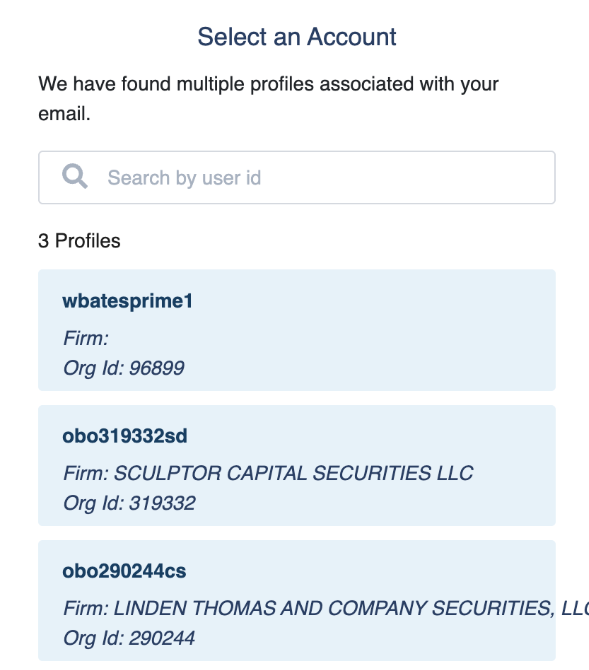
- Important: In case of using On Behalf Of feature, you will see your Prime account listed first, followed by profiles from organizations that have given you permission to submit files for them. Profile accounts always start with [obo+the Org ID]. Select the profile you want to submit on behalf of.
- Select Upload in the left menu bar or from the dashboard page
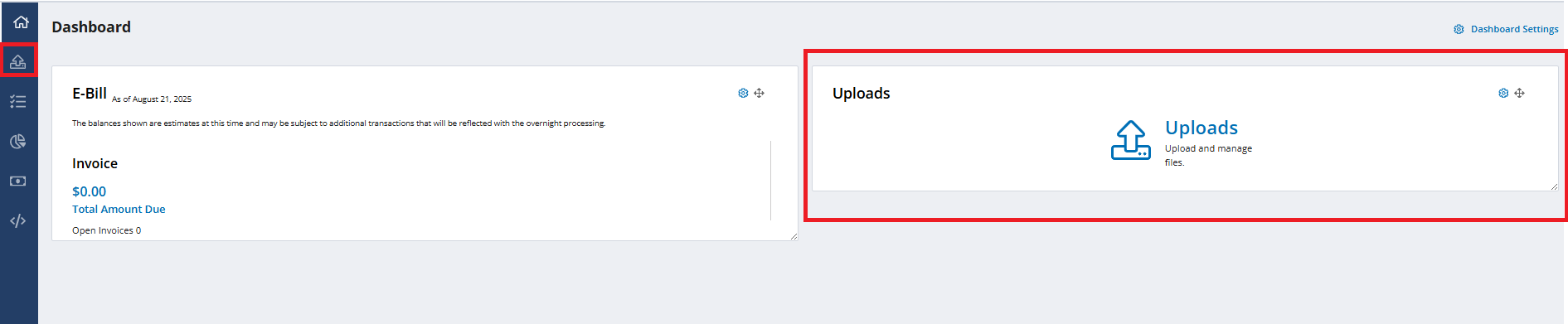
- Make your selections and Submit your file for upload. You must upload one file at a time, and file size cannot exceed 5120 MB.
- Select the Upload File History tab to view the files you have uploaded for the past thirty days. Select the File Feedback tab to download your file with FINRA’s feedback.
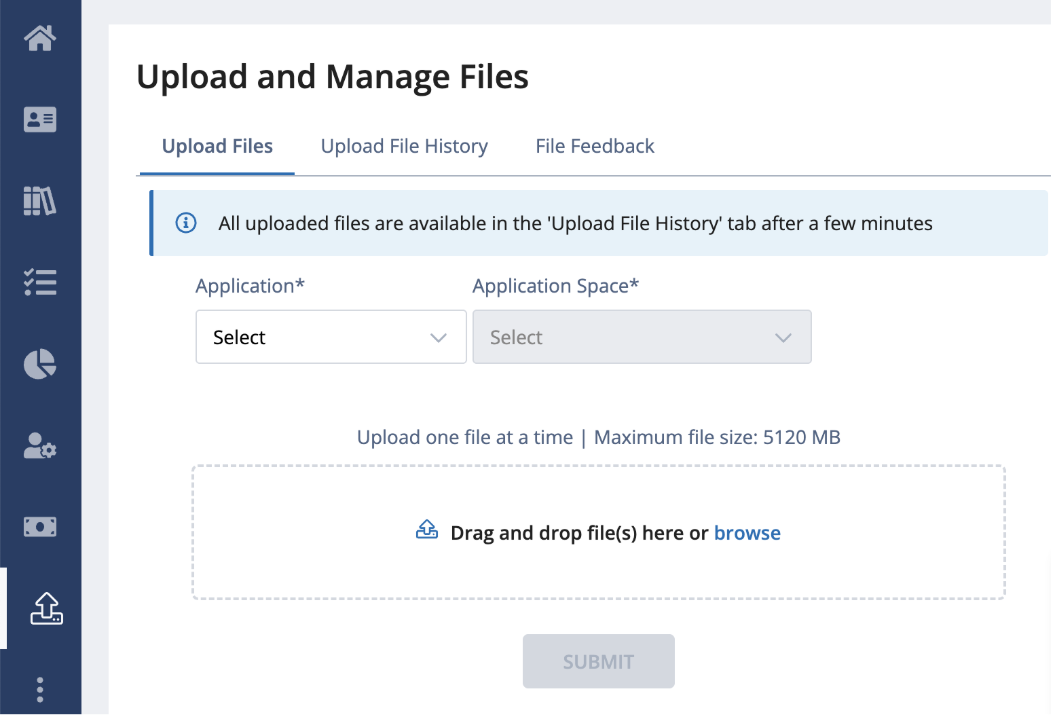
- To switch Profiles while using On Behalf Of (OBO) feature, go to your account and select Manage Log Ins.
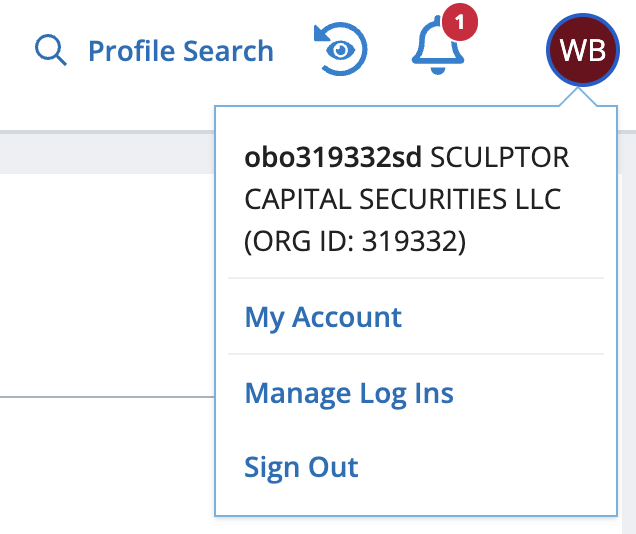
- From the login screen, you can change accounts, complete MFA, and then you can upload files for another profile.
HTTPS REST API
The following steps are required to use the fileX HTTPS REST API service:
- Open firewall to allow outbound traffic on port 443 from your outbound server IP address to fileX HTTPS REST APIs and to FINRA Identity Platform (FIP) API endpoints
- Request FINRA Credentials (if not already available) with entitlements for specific FINRA application file transfer (see section 4)
- Open firewalls to allow traffic to/from AWS S3. Upload and Download services currently use native AWS S3 endpoints.
- For AWS S3 IP ranges refer to: https://docs.aws.amazon.com/general/latest/gr/aws-ipranges.html
- Invoke FIP OAUTH API to obtain OAUTH token
- Invoke/Call fileX HTTP REST APIs with FIP OAUTH token as detailed in section 5 below
HTTPS Endpoints
fileX provides the following HTTPs endpoints to users.
List Available Applications
Provides an ability to get all the applications or directories that the user has access to.
Request Parameter
Parameters Required Accepted Values Case Sensitive Description ORG_ID Y Numerical values 0-9+ N Number representing the account’s orgId provided by FINRA (e.g. 0001 or 888888) Response Parameter
Element/Attribute Key Description name Name of the present working space/directory type Type of this object
DIR = directorymetadata -> writable denotes if this is a writable space true/false children Child spaces/directories accessible Name, type, and metadata values are similar to self _links API links to self and children Sample Code for GET a list of available applications
Step 1: Get OAUTH2 access_token from FIP OAUTH2 API (HTTP Method: POST) curl --location --request POST 'https://ews.fip.finra.org/fip/rest/ews/oauth2/access_token?grant_type=c…' --header 'Authorization: Basic XXXXXXXXXXXXXXXXXXXXXXXXXXX'
Step 2: Invoke fileX API (HTTP Method: GET) curl -X GET https://filex.finra.org/files/0001 -H "Accept: application/json" -H "Authorization: Bearer <access_token>"
GET Sample Request to fileX APIhttps://filex.finra.org/fileX/0001
GET Sample Response{ "name": "0001", "type": "DIR", "metadata": { "writable": false }, "children": [ { "name": "testDIR1", "type": "DIR", "metadata": { "writable": false } }, { "name": "testDIR2", "type": "DIR", "metadata": { "writable": false } } ], "_links": { "self": [ { "href": "https://filex.finra.org/files/0001" } ], "parent": [ { "href": "https://filex.finra.org/files" } ], "children": [ { "href": "https://filex.finra.org/files/0001/testDIR1" }, { "href": "https://filex.finra.org/files/0001/testDIR2" } ] } }
List Available Application Sub Spaces
Provides a list of sub-spaces within a given application or directory as well as links to the directory and spaces
Request Parameters
Parameters Required Accepted Values Case Sensitive Description ORG_ID Y Numerical values 0-9+ N Number representing the account’s orgId provided by FINRA (e.g. 0001 or 888888) APPLICATION Y Alphanumeric [a-zA-Z0-9] Y Name of the FINRA application (e.g. focus, crd, appX) Response Parameters
Element/Attribute Key Description name Name of the present working space/directory type Type of this object
DIR = directorymetadata -> writable denotes if this is a writable space
true/falsechildren Child spaces/directories accessible
Name, type, and metadata values are similar to self_links API links to self and children Sample Code for GET a list of available application spaces
Step 1: Get OAUTH2 access_token from FIP OAUTH2 API (HTTP Method: POST) curl --location --request POST 'https://ews.fip.finra.org/fip/rest/ews/oauth2/access_token?grant_type=c…' --header 'Authorization: Basic XXXXXXXXXXXXXXXXXXXXXXXXXXX'
Step 2: Invoke fileX API (HTTP Method: GET) curl -X GET https://filex.finra.org/files/0001 -H "Accept: application/json" -H "Authorization: Bearer <access_token>"
" GET Sample Request to fileX APIhttps://filex.finra.org/fileX/0001/app1
GET Sample Response{ "name": "app1", "type": "DIR", "metadata": { "writable": false }, "children": [ { "name": "out", "type": "DIR", "metadata": { "writable": false } }, { "name": "in", "type": "DIR", "metadata": { "writable": true } }, { "name": "in_arcv", "type": "DIR", "metadata": { "writable": false } } ], "_links": { "self": [ { "href": "https://filex.finra.org/files/0001/app1" } ], "parent": [ { "href": "https://filex.finra.org/files/0001" } ], "children": [ { "href": "https://filex.finra.org/files/0001/app1/out" }, { "href": "https://filex.finra.org/files/0001/app1/in" }, { "href": "https://filex.finra.org/files/0001/app1/in_arcv" } ] } }
List Available Files in Application Sub Space
Provides an ability to get all the application sub-spaces that the user has access to.
Request Parameter
Parameters Required Accepted Values Case Sensitive Description ORG_ID N Numerical values 0-9+ N/A Number representing the account’s orgId provided by FINRA (e.g. 0001 or 888888) APPLICATION Y Alphanumeric [a-zA-Z0-9] Y Name of the FINRA application SUB_SPACE Y Alphanumeric [a-zA-Z0-9] Y Name of the FINRA application subspace Response Parameter
Element/Attribute Key Description name Name of the present working space/directory type Type of this object
DIR = directorymetadata -> writable denotes if this is a writable space true/false children -> name Name of the file children -> type Type of this object FILE = file children -> metadata -> writable denotes if this file can be modified true/false children -> metadata -> contentLength Size of the file in bytes children -> metadata -> lastModified Time file was last modified with UTC time zone _links API links to parent, self and children Sample Code for GET a list of available applications
Step 1: Get OAUTH2 access_token from FIP OAUTH2 API (HTTP Method: POST) curl --location --request POST 'https://ews.fip.finra.org/fip/rest/ews/oauth2/access_token?grant_type=c…' --header 'Authorization: Basic XXXXXXXXXXXXXXXXXXXXXXXXXXX'
Step 2: Invoke fileX API (HTTP Method: GET) curl -X GET https://filex.finra.org/files/0001/app1/out -H "Accept: application/json" -H "Authorization: Bearer <access_token>"
" GET Sample Request to fileX APIhttps://filex.finra.org/fileX/0001/app1/out
GET Sample Response{ "name": "out", "type": "DIR", "metadata": { "writable": false }, "children": [ { "name": "Testfile.txt", "type": "FILE", "metadata": { "writable": false, "contentLength": 130766, "lastModified": "2025-08-04T07:30:34.000-04:00" } }, { "name": "Testfile2.txt", "type": "FILE", "metadata": { "writable": false, "contentLength": 130766, "lastModified": "2025-08-05T07:29:18.000-04:00" } } ], "_links": { "self": [ { "href": "https://filex.finra.org/files/0001/app1/out" } ], "parent": [ { "href": "https://filex.finra.org/files/0001/app1" } ], "children": [ { "href": "https://filex.finra.org/files/0001/app1/out/Testfile.txt" }, { "href": "https://filex.finra.org/files/0001/app1/out/Testfile2.txt" } ] } }
Python Code Sample to get a list of filesimport base64, requests, sys, json username = '1234ftp12' password = '******' # Base64 encode username:password userpass = username + ":" + password authorization = base64.b64encode(userpass.encode()).decode() # Prepare headers for POST call to FIP OAUTH2 fipRequestHeaders = { 'Authorization': 'Basic ' + authorization, } # Make the request to FIP fipUrl = 'https://ews.fip.finra.org/fip/rest/ews/oauth2/access_token?grant_type=client_credentials' fipResponse = requests.post(fipUrl, headers=fipRequestHeaders) fipResponseJson = json.loads(fipResponse.text) # Retrieve access token from FIP response access_token = fipResponseJson["access_token"] # Prepare headers for GET call to fileX API fileXRequestHeaders = { 'Authorization': 'Bearer ' + access_token, 'Accept': 'application/json', } fileXUrl = "https://filex.finra.org/files/0001/app1/out" # Make the request fileXResponse = requests.get(fileXUrl, headers=fileXRequestHeaders)
Download File from Application Sub Space
Provides an ability to download files from application sub-spaces that the user has access to.
Request Parameter
Parameters Required Accepted Values Case Sensitive Description ORG_ID N Numerical values 0-9+ N/A Number representing the account’s orgId provided by FINRA (e.g. 0001 or 888888) APPLICATION Y Alphanumeric [a-zA-Z0-9] Y Name of the FINRA application SUB_SPACE Y Alphanumeric [a-zA-Z0-9] Y Name of the FINRA application subspace FILE_NAME Y Alphanumeric [a-zA-Z09]!@,&-='. Y Name of the file Response Parameter
Element/Attribute Key Description url URL used to execute the file download via GET call expirationTime Time URL expires. Cannot initiate download after expiration time. Sample Code to download a file
Step 1: Get OAUTH2 access_token from FIP OAUTH2 API (HTTP Method: POST) curl --location --request POST 'https://ews.fip.finra.org/fip/rest/ews/oauth2/access_token?grant_type=c…' --header 'Authorization: Basic XXXXXXXXXXXXXXXXXXXXXXXXXXX'
Step 2: Invoke fileX API (HTTP Method: GET) curl -X GET https://filex.finra.org/files/0001/app1/out/testfile.txt -H "Accept: application/json" -H "Authorization: Bearer <access_token>"
" GET the pre-signed URL from the fileX APIhttps://filex.finra.org/fileX/0001/app1/out/testfile.txt
Sample Response for the pre-signed URL{ "url": "https://1422-4800-0760-filex-qa-int.s3.amazonaws.com/79/fileX/out/0AcREpi4FR-AtestVerboseRegexWithLette-1%2FX-Amz-Expires=60&X-Amz-SignedHeaders=host&X-Amz-Security-Token=FwoGZXIvYXdzEOX%2F%2F%2F%2F%2F%2F%2F%2F%2F%2FwEaDA3fRJlRsgYWKxgu5yLUAT3YUGSbtHh1G93w0BDuYQvcImXpEP7gu51a6088df6764d73fc5cd9b", "expirationTime": "2025-08-23T07:53:34.620-04:00" }
Python code sample to get the pre-signed URL:import base64, requests, sys, json username = '1234ftp12' password = '******' # Base64 encode username:password userpass = username + ":" + password authorization = base64.b64encode(userpass.encode()).decode() # Prepare headers for POST call to FIP OAUTH2 fipRequestHeaders = { 'Authorization': 'Basic ' + authorization, } # Make the request to FIP fipUrl = 'https://ews.fip.finra.org/fip/rest/ews/oauth2/access_token?grant_type=client_credentials' fipResponse = requests.post(fipUrl, headers=fipRequestHeaders) fipResponseJson = json.loads(fipResponse.text) # Retrieve access token from FIP response access_token = fipResponseJson["access_token"] # Prepare headers for GET call to fileX API fileXRequestHeaders = { 'Authorization': 'Bearer ' + access_token, 'Accept': 'application/json', } fileXUrl = "https://filex.finra.org/files/0001/app1/out/testfile.txt" # Make the request fileXResponse = requests.get(fileXUrl, headers=fileXRequestHeaders)
Upload File to Application Sub Space
This method allows users to upload file(s) to an application sub-space
Request Parameter
Parameters Required Accepted Values Case Sensitive Description ORG_ID N Numerical values 0-9+ N/A Number representing the account’s orgId provided by FINRA (e.g. 0001 or 888888) APPLICATION Y Alphanumeric [a-zA-Z0-9] Y Name of the FINRA application SUB_SPACE Y Alphanumeric [a-zA-Z0-9] Y Name of the FINRA application subspace FILE_NAME Y Alphanumeric [a-zA-Z09]!@,&-='. Y Name of the file filex-
{attribute}
N Alphanumeric [a-zA-Z09]!@,&-='. N Optional metadata that can be attached with the file e.g. filex-InternalReference Response Parameter
Element/Attribute Key Description url URL used to execute the file download via GET call expirationTime Time URL expires. Cannot initiate download after expiration time. trackingId Unique Identifier to track the upload file request Sample Code for Upload file(s) to the application sub-space
Step 1: Get OAUTH2 access_token from FIP OAUTH2 API (HTTP Method: POST) curl --location --request POST 'https://ews.fip.finra.org/fip/rest/ews/oauth2/access_token?grant_type=c…' --header 'Authorization: Basic XXXXXXXXXXXXXXXXXXXXXXXXXXX'
Step 2: Invoke fileX API (HTTP Method: PUT) curl -X PUT https://filex.finra.org/files/0001/app1/in/newfile.zip -H "Accept: application/json" -H "Authorization: Bearer <access_token>"
" PUT Request for the pre-signed URL from the fileX APIhttps://filex.finra.org/fileX/0001/app1/in/newfile.zip
Sample Response for the pre-signed URL{ "url": "https://1422-4800-0760-filex-qa-int.s3.amazonaws.com/79/fZizZcf3%2BYYI%2FuZrapUY%2F5Z%24lqsfOn4%2Bbkj4buGKefeI5IZ0Ew78bh6i7I7gOD9FA7qM2j1ZB%2FSsIkfJnHjfGL1beC8x%2FM3Vu9XpiTOKpemHXdlK9kyep%2FrsPwmFKK6Wp8UGMi1L%2F4BkKr1jLBLX268iYeGXlO2IUgIARg05d9jmRJ9%2BLviuLtAROJfTESifFCw%3D&X-Amz-Signature=7e5b6c1b156c83ff22492855acc714bdd981b34b775dfe07e08ad846d61358b5", "expirationTime": "2025-08-23T10:08:42.244-04:00", "trackingId": "d3caf6d8-34a4-4b83-9b63-b20dc055286" }
Python code sample to get the pre-signed URL:import base64, requests, sys, json username = '1234ftp12' password = '******' # Base64 encode username:password userpass = username + ":" + password authorization = base64.b64encode(userpass.encode()).decode() # Prepare headers for POST call to FIP OAUTH2 fipRequestHeaders = { 'Authorization': 'Basic ' + authorization, } # Make the request to FIP fipUrl = 'https://ews.fip.finra.org/fip/rest/ews/oauth2/access_token?grant_type=client_credentials' fipResponse = requests.post(fipUrl, headers=fipRequestHeaders) fipResponseJson = json.loads(fipResponse.text) # Retrieve access token from FIP response access_token = fipResponseJson["access_token"] # Prepare headers for GET call to fileX API fileXRequestHeaders = { 'Authorization': 'Bearer ' + access_token, 'Accept': 'application/json', } fileXUrl = "https://filex.finra.org/files/0001/app1/out/newfile.zip" # Make the request fileXResponse = requests.get(fileXUrl, headers=fileXRequestHeaders)Step3, cURL to upload the file using pre-signed URL in Step 2 (HTTP Method: PUT): curl –X PUT –T ./newFile.zip
Track File uploaded to Application Sub Space
This method allows users to track uploaded files
- Tracking without a specific identifier {TRACKING_ID} would return status of all the submissions made in last 90 days.
Request Parameter
Parameters Required Accepted Values Case Sensitive Description TRACKING_ID N UUID in alphanumeric
with ‘-Y Unique identifier returned when file was uploaded to an application sub-space Response Parameter
Element/Attribute Key Description trackingId Unique identifier returned when file was uploaded to an application sub-space submissionTime Time at which file was submitted userName Username of the account which was used to upload the file fileName Name of the file submitted status Two possible values:
Request Received
(pre-signed URL sent by fileX for the upload request)
Received by FINRA
(file received by fileX through the pre-signed URL)downstreamStatus Four possible values:
RECEIVED - (file received by fileX)
ACCEPTED - (FINRA has received and successfully processed the file)
REJECTED - (FINRA has received and found processing error(s) with the file. The
entire file needs to be resubmitted)
PARTIALLY_REJECTED - (FINRA has received the file and found processing
error(s) with the file. A new file with only corrected data needs to be submitted
again.)statusUpdatedTime Time when status was last updated. Will be used in future by applications to
update file processing statusfileSize Size of the file submitted uploadLocation Location at which file was submitted application Application the file was uploaded to applicationSpace Specific application space the file was uploaded to arcvFileName Name of the submitted file in in_arcv location downloadable If the arcv file is available for download (If the submission time is within 30 days) Sample Code for Upload file(s) to the application sub-space
Step 1: Get OAUTH2 access_token from FIP OAUTH2 API (HTTP Method: POST) curl --location --request POST 'https://ews.fip.finra.org/fip/rest/ews/oauth2/access_token?grant_type=c…' --header 'Authorization: Basic XXXXXXXXXXXXXXXXXXXXXXXXXXX'
Step 2: Invoke fileX API (HTTP Method: GET) curl -X GET https://filex.finra.org/tracking?id={TRACKING_ID}-H "Accept: application/json" -H "Authorization: Bearer <access_token>"
GET Request for the pre-signed URL from the fileX APIhttps://filex.finra.org/tracking?id=50e1b1c5-6150-4423-9da6-3c51ea34fc30
Sample Response for the pre-signed URL[ { "trackingId": "55390700-bfeb-4c88-9015-bff97ec83e00", "submissionTime": null, "userName": "filexuser79", "fileName": "testfile.txt", "status": "Request Received", "downstreamStatus": null, "statusUpdatedTime": "2025-11-20T21:02:47.428-05:00", "fileSize": 0, "uploadLocation": "79/fileX/in", "applicationName": "fileX", "applicationSpaceName": "in", "arcvFileName": null, "downloadable": false, "_links": [ { "rel": "self", "href": "https://filex-int.qa.finra.org/tracking?id=55390700-bfeb-4c88-9015-bff97ec83e00" }, { "rel": "parent", "href": "https://filex-int.qa.finra.org/tracking" } ] } ]
Python code sample to get the pre-signed URL:import base64, requests, sys, json username = '1234ftp12' password = '******' # Base64 encode username:password userpass = username + ":" + password authorization = base64.b64encode(userpass.encode()).decode() # Prepare headers for POST call to FIP OAUTH2 fipRequestHeaders = { 'Authorization': 'Basic ' + authorization, } # Make the request to FIP fipUrl = 'https://ews.fip.finra.org/fip/rest/ews/oauth2/access_token?grant_type=client_credentials' fipResponse = requests.post(fipUrl, headers=fipRequestHeaders) fipResponseJson = json.loads(fipResponse.text) # Retrieve access token from FIP response access_token = fipResponseJson["access_token"] # Prepare headers for GET call to fileX API fileXRequestHeaders = { 'Authorization': 'Bearer ' + access_token, 'Accept': 'application/json', } fileXUrl = "https://filex.finra.org/tracking?id=50e1b1c5-6150-4423-9da6-3c51ea34fc30" # Make the request fileXResponse = requests.get(fileXUrl, headers=fileXRequestHeaders)Step3, cURL to upload the file using pre-signed URL in Step 2 (HTTP Method: PUT): curl –X PUT –T ./newFile.zip